
![Featured image for [Node.js] npm install mysql2](https://tired-i.com/wp-content/uploads/2026/01/node-js-npm-ins-image.png)

생활코딩 Node.js – MySQL 강의를 듣고서 작성한 글입니다. 그냥 그렇다고요.

1. MySQL 연결하기
const mysql = require('mysql');
const db = mysql.createConnection({
    host: 'localhost',
    user: 'nodejs',
    password: '123456',
    database: 'opentutorials'
});
db.connect();

...

db.end();
Code language: JavaScript (javascript)
2. Error: connect ECONNREFUSED 127.0.0.1:3306
Error: connect ECONNREFUSED 127.0.0.1:3306
Code language: CSS (css)
main.js가 있는 컨테이너에서 mysql이 있는 컨테이너를 찾지 못하고 있다.
서로 다른 컨테이너에 있기에 localhost로는 접근할 수 없다.
가. IP로 접근하기
container가 할당받은 internal ip로 접근하고자 하는 컨테이너를 선택할 수 있다.
docker inspect study_nodejs-mysql-1로 container의 network setting을 보면 해당 container가 docker 내부에서 사용하는 internal ip를 확인할 수 있다.
"NetworkSettings": {
            "Bridge": "",
            "SandboxID": "8ebe2ec0632583d7dc26a36fe03629385458daac7196080b4641afebca96ed18",
            "HairpinMode": false,
            "LinkLocalIPv6Address": "",
            "LinkLocalIPv6PrefixLen": 0,
            "Ports": {},
            "SandboxKey": "/var/run/docker/netns/8ebe2ec06325",
            "SecondaryIPAddresses": null,
            "SecondaryIPv6Addresses": null,
            "EndpointID": "",
            "Gateway": "",
            "GlobalIPv6Address": "",
            "GlobalIPv6PrefixLen": 0,
            "IPAddress": "",
            "IPPrefixLen": 0,
            "IPv6Gateway": "",
            "MacAddress": "",
            "Networks": {
                "study_nodejs_default": {
                    "IPAMConfig": null,
                    "Links": null,
                    "Aliases": [
                        "study_nodejs-mysql-1",
                        "mysql",
                        "58f4d2021666"
                    ],
                    "NetworkID": "6fe5c3871a75a3c2084445177dac1f5cd693b964cbe1bb389e7c9d268cc98a77",
                    "EndpointID": "",
                    "Gateway": "",
                    "IPAddress": "",
                    "IPPrefixLen": 0,
                    "IPv6Gateway": "",
                    "GlobalIPv6Address": "",
                    "GlobalIPv6PrefixLen": 0,
                    "MacAddress": "",
                    "DriverOpts": null
                }
            }
        }
Code language: JavaScript (javascript)
왜 없?
This is expected; from the output; the container is running in host-mode networking (
--network=host); in that mode, the container does not have its own networking namespace, and shares the networking namespace with the host. Basically (from a networking perspective) it’s the equivalent of running the process directly on the host, outside of a container.
host driver라서 IP가 안 보이는 것이라고 한다.
그러면 정말 네트워크에 연결된 컨테이너는 host 모드인 건가?
❯ docker inspect study_nodejs_default
[
    {
        "Name": "study_nodejs_default",
        "Id": "1c29f9b6d472e545dfa9635946c72a0f670411fa2a1f413565276bab573a2cf3",
        "Created": "2023-03-13T07:09:02.038560385Z",
        "Scope": "local",
        "Driver": "bridge",
        "EnableIPv6": false,
        "IPAM": {
            "Driver": "default",
            "Options": null,
            "Config": [
                {
                    "Subnet": "172.22.0.0/16",
                    "Gateway": "172.22.0.1"
                }
            ]
        },
        "Internal": false,
        "Attachable": false,
        "Ingress": false,
        "ConfigFrom": {
            "Network": ""
        },
        "ConfigOnly": false,
        "Containers": {},
        "Options": {},
        "Labels": {
            "com.docker.compose.network": "default",
            "com.docker.compose.project": "study_nodejs",
            "com.docker.compose.version": "2.15.1"
        }
    }
]
Code language: JavaScript (javascript)study_nodejs_default는 bridge 모드다.
"Subnet": "172.22.0.0/16", "Gateway": "172.22.0.1"이다.
#study_nodejs-studynode-1
hostname -I | awk '{print $1}'
172.22.0.3
Code language: PHP (php)
컨테이너의 ip는 네트워크와는 다르다.
host mode는 아닌 것 같은데….
버근가?
This is an Engine bug, which is triggered when attempting to connect a container to a network it’s already connected to. I’ve opened an issue here:
아… 버그다.
이미 차근차근 컨테어너랑 네트워크 삭제하고 다시 compose하면…
❯ docker network inspect study_nodejs_default
[
    {
        "Name": "study_nodejs_default",
        "Id": "e17c7563088044efa15604c77da469625dca9735e035d2b19f67735362e4ce5b",
        "Created": "2023-03-13T10:08:00.367803967Z",
        "Scope": "local",
        "Driver": "bridge",
        "EnableIPv6": false,
        "IPAM": {
            "Driver": "default",
            "Options": null,
            "Config": [
                {
                    "Subnet": "172.23.0.0/16",
                    "Gateway": "172.23.0.1"
                }
            ]
        },
        "Internal": false,
        "Attachable": false,
        "Ingress": false,
        "ConfigFrom": {
            "Network": ""
        },
        "ConfigOnly": false,
        "Containers": {
            "3ad6ed477f75888d5a937743258aae2d0f8ab17235ad37f7549c67bdebaf42f7": {
                "Name": "study_nodejs-studynode-1",
                "EndpointID": "376deceba722d9f74f5384e828cc93582e83c209aa0f657434452f76f3e530ac",
                "MacAddress": "02:42:ac:17:00:03",
                "IPv4Address": "172.23.0.3/16",
                "IPv6Address": ""
            },
            "b3a6c2fe9e9d43dc4bc415e0ede8af60ba7bcb93a1d8ef0296d13567ae860381": {
                "Name": "study_nodejs-mysql-1",
                "EndpointID": "d35d7226a39815ed23228de061531a8e0c3554cef525ce445d985e2a0534e030",
                "MacAddress": "02:42:ac:17:00:02",
                "IPv4Address": "172.23.0.2/16",
                "IPv6Address": ""
            }
        },
        "Options": {},
        "Labels": {
            "com.docker.compose.network": "default",
            "com.docker.compose.project": "study_nodejs",
            "com.docker.compose.version": "2.15.1"
        }
    }
]
Code language: JavaScript (javascript)
"Containers": {...}에 정상적으로 컨테이너들이 존재하고 ip도 확인할 수 있다.
???
끄고 다시 하면 사라짐.
❯ docker network inspect study_nodejs_default
[
    {
        "Name": "study_nodejs_default",
        "Id": "e17c7563088044efa15604c77da469625dca9735e035d2b19f67735362e4ce5b",
        "Created": "2023-03-13T10:08:00.367803967Z",
        "Scope": "local",
        "Driver": "bridge",
        "EnableIPv6": false,
        "IPAM": {
            "Driver": "default",
            "Options": null,
            "Config": [
                {
                    "Subnet": "172.23.0.0/16",
                    "Gateway": "172.23.0.1"
                }
            ]
        },
        "Internal": false,
        "Attachable": false,
        "Ingress": false,
        "ConfigFrom": {
            "Network": ""
        },
        "ConfigOnly": false,
        "Containers": {},
        "Options": {},
        "Labels": {
            "com.docker.compose.network": "default",
            "com.docker.compose.project": "study_nodejs",
            "com.docker.compose.version": "2.15.1"
        }
    }
]
Code language: JavaScript (javascript)
와우
심지어 docker inspect 컨테이너하면 컨테이너의 동작 유무와도 상관없이 안 보인다…. 쓰읍..
internal ip를 사용해서 mysql에 연결하는 것은 불안정하기도 하고 다른 환경에서 compose하면 ip가 변할 수 있기에 적합하지 않다.
→npm install mysql2로 변경하면 잘 동작한다. MySQL 버전 8 이상은 npm install mysql과 잘 맞지 않는다.
내 시간 돌려줘
나. Network drivers

도커의 네트워킹 서브시스템은 드라이버를 사용하여 플러그인 방식으로 구성됩니다. 기본적으로 여러 드라이버가 제공되며, 핵심 네트워킹 기능을 제공합니다.
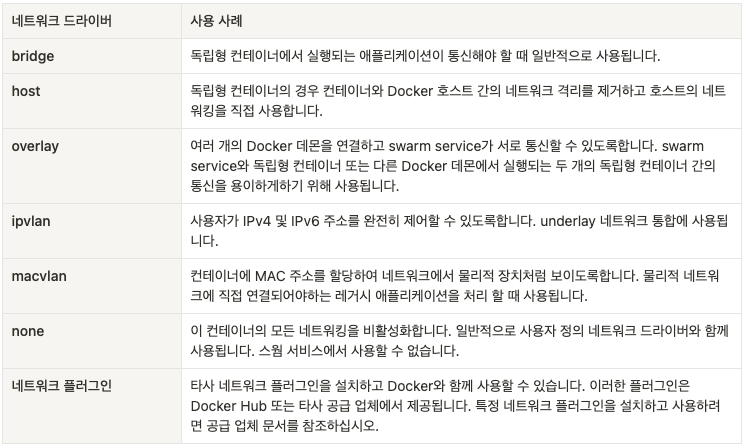
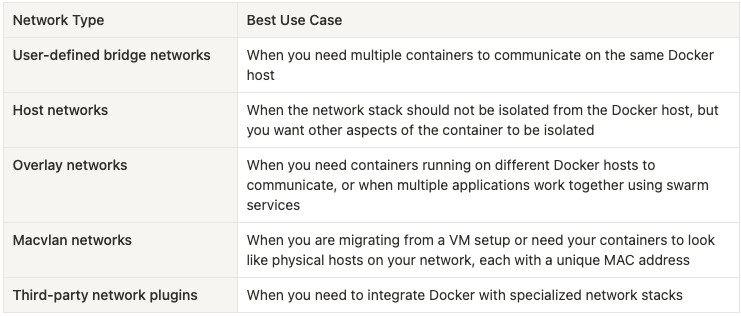
docker-compose up하면 기본적으로 생기는 디폴트 네트워크는 bridge driver로 고유의 namespace를 가진다.
❯ docker network list
NETWORK ID     NAME                   DRIVER    SCOPE
124a8dcb2311   bridge                 bridge    local
72d31531b4db   host                   host      local
06e6adc3efdc   none                   null      local
1c29f9b6d472   study_nodejs_default   bridge    local
Code language: PHP (php)
❯ docker inspect study_nodejs_default
[
{
"Name": "study_nodejs_default",
"Id": "1c29f9b6d472e545dfa9635946c72a0f670411fa2a1f413565276bab573a2cf3",
"Created": "2023-03-13T07:09:02.038560385Z",
"Scope": "local",
"Driver": "bridge",
"EnableIPv6": false,
"IPAM": {
"Driver": "default",
"Options": null,
"Config": [
{
"Subnet": "172.22.0.0/16",
"Gateway": "172.22.0.1"
}
]
},
"Internal": false,
"Attachable": false,
"Ingress": false,
"ConfigFrom": {
"Network": ""
},
"ConfigOnly": false,
"Containers": {},
"Options": {},
"Labels": {
"com.docker.compose.network": "default",
"com.docker.compose.project": "study_nodejs",
"com.docker.compose.version": "2.15.1"
}
}
]
Code language: JavaScript (javascript)study_nodejs_default는 bridge 모드다. ("Subnet": "172.22.0.0/16", "Gateway": "172.22.0.1")
3. docker-compose.yml 환경변수 이용
services:
  web:
    build: .
    ports:
      - "8000:8000"
  db:
    image: postgres
    ports:
      - "8001:5432"
Code language: JavaScript (javascript)
docker compose up를 실행하면 다음 일이 발생합니다.
myapp_default라는 네트워크가 생성됩니다.web의 구성을 사용하여 컨테이너가 생성됩니다. 컨테이너는myapp_default라는 이름의 네트워크에 조인되며web이라는 이름으로 생성됩니다.db의 구성을 사용하여 컨테이너가 생성됩니다. 컨테이너는myapp_default라는 이름의 네트워크에 조인되며db라는 이름으로 생성됩니다.
각 컨테이너는 이제 호스트 이름 web 또는 db를 조회하고 적절한 컨테이너의 IP 주소를 가져올 수 있습니다.
예를 들어, web의 애플리케이션 코드는 URL postgres://db:5432에 연결하여 Postgres 데이터베이스를 사용할 수 있습니다.
가. docker-compose.yml을 수정해 보자.
studynode 컨테이너가 mysql 컨테이너를 찾아갈 수 있도록 studynode의 환경변수를 추가한다.
version : '3.7'

services:
  mysql:
    image : mysql:8.0.32
    volumes:
      - ./db_data:/var/lib/mysql
    restart: always
    environment:
      MYSQL_ROOT_PASSWORD: 123456
      MYSQL_DATABASE: opentutorials
      MYSQL_USER: nodejs
      MYSQL_PASSWORD: 123456

  studynode:
    depends_on:
      - mysql
    image : ghcr.io/ramen4598/studynode:3.0-multiarch
    volumes :
      - ./src/:/app/src/
    ports :
      - "3000:3000"
    restart : always
    environment:
      MYSQL_HOST: mysql <- 이것! 중요
      MYSQL_DATABASE: opentutorials
      MYSQL_USER: nodejs
      MYSQL_PASSWORD: 123456
      MYSQL_PORT: 3306 <- 이것! 중요
Code language: JavaScript (javascript)main.js를 수정한다.
/*
const mysql = require('mysql');
const db = mysql.createConnection({
    host: '127.0.0.1',
  port: '3306',
    user: 'nodejs',
    password: '123456',
    database: 'opentutorials'
});
db.connect();
*/

const mysql = require('mysql2');
const db = mysql.createConnection({
  host: process.env.MYSQL_HOST,
  user: process.env.MYSQL_USER,
  password: process.env.MYSQL_PASSWORD,
  database: process.env.MYSQL_DATABASE,
  port: process.env.MYSQL_PORT
});
db.connect();
Code language: JavaScript (javascript)
Node.js에서 환경변수를 읽는 방법에 관한 설명이다.
다. Error: ER_NOT_SUPPORTED_AUTH_MODE: Client does not support authentication protocol requested by server; consider upgrading MySQL client
Error: ER_NOT_SUPPORTED_AUTH_MODE: Client does not support authentication protocol requested by server; consider upgrading MySQL client
Code language: JavaScript (javascript)- If you just want to get rid of the error, at the cost of risking the security of the project (e.g. it’s just a personal project or dev environment), go with @Pras’s answer —
ALTER USER 'root'@'localhost' IDENTIFIED WITH mysql_native_password BY 'password'and thenflush privileges - If you want to have a fix for it, without knowing why, just install and use
mysql2(instead ofmysql) and use it —npm i mysql2, andmysql = require('mysql2');. - If you are a curious developer who is always eager to learn, keep reading … 🙂

npm i mysql2
//main.js 교체
mysql = require('mysql2');
Code language: JavaScript (javascript)
4. query문 작성하기
//main.js

const http = require("http");
const fs = require("fs");
const url = require("url");
const qs = require("querystring");
const path = require("path");
const sanitizeHtml = require("sanitize-html");
const template = require("./lib/template.js");
const dataDir = "/app/src/data";
const mysql = require('mysql2');
const db = mysql.createConnection({
  host: process.env.MYSQL_HOST,
  user: process.env.MYSQL_USER,
  password: process.env.MYSQL_PASSWORD,
  database: process.env.MYSQL_DATABASE,
  port: process.env.MYSQL_PORT
});
db.connect();

const app = http.createServer(function (request, response) {
  const _url = request.url;
  const queryData = url.parse(_url, true).query;
  const pathname = url.parse(_url, true).pathname;

  /**디렉터리 안에 파일의 이름을 읽고  html response함.
   * path, title, decscription, control
   */
    function readAndRes(path, title, description, control) {
    // fs.readdir(path, function (err, filelist) {
    //   const noData = `ENOENT: no such file or directory, scandir '/app/src/data'`;
    //   if (err && err.message === noData) {
    //     fs.mkdirSync(path, { recursive: true });
    //     filelist = [""];
    //   }
    //   let list = template.List(filelist);
    //   let html = template.HTML(title, list, control, description);
    //   response.writeHead(200);
    //   response.end(html);
    // });
        db.query(`SELECT * FROM topic`, function(error, topics){
      if(error){
        throw error;
      }
      console.log(topics);
          let list = template.List(topics);
          let html = template.HTML(title, list, control, description);
          response.writeHead(200);
          response.end(html);
        });
    }

  if (pathname === "/") {
    if (queryData.id === undefined) {
      let title = "Welcome :)";
      let description = "Here is for to test node.js server :)";
      let control = `
        <input type="button" value="create" onclick="redirect(this, '${title}')"/>
      `;
      readAndRes(dataDir, title, description, control);
    } else {

            ...

app.listen(3000);
Code language: JavaScript (javascript)
mysql의 topic table에 모든 값을 받아와서 이 것을 template.List로 전달해 준다.
이때 topics는 객체의 배열이다.
객체는 각각의 튜플을 나타낸다.
//template.js
List : function(topics) {
  let list = '<ul>';
  for( let i = 0; i < topics.length; i++){
      list += `<li><a href="/?id=${topics[i].id}">${topics[i].title}</a></li>`;
    }
    list += '</ul>';
    return list;
}
Code language: PHP (php)template.js에서는 topics를 받아서 각각의 db의 튜플에 대한 a(링크)를 생성한 다음 반환한다.
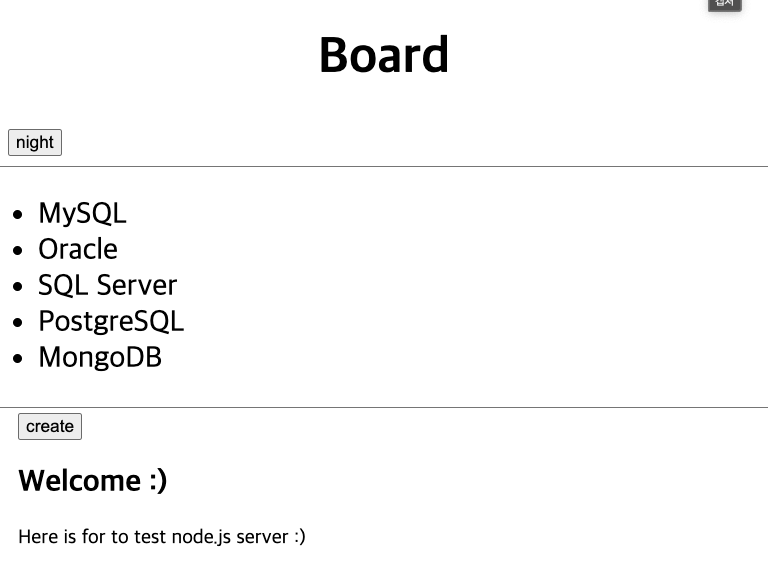
일단 연결하는 것엔 성공했다.