
IntelliJ 초기 설정

Featured image for IntelliJ 초기 설정

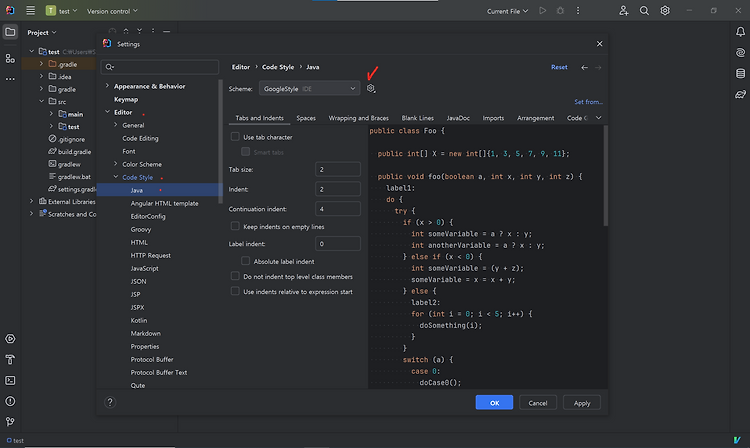
1. Intellij 가. code convention ctrl+alt+s → setting으로 들어간다. Editor → Code Style → Java로 들어간다. 다운로드 받은 xml 파일을 선택하고 적용한다. actions on Save 검색 → Reformat code와 Optimize imports 옵션 활성화. (선택사항) import 검색 후 Add umambiguous imports on the fly와 Optimize imports on the fly 활성화. 나. Build, Test Tools 변경 gradle … 더 읽기

[NeoVim] 설치 및 설정

Featured image for [NeoVim] 설치 및 설정

1. Neovim 설치 Neovim Hyperextensible Vim-based text editor 2. Neovim 기본 설정 가. 기본 config 파일 생성 나. options.lua 다. init.lua vim의 .vimrc의 역할을 수행한다. 3. Neovim plugin 설치 Top Neovim Plugins in 2026 List of the most popular Neovim plugins by total number of installs across 1000+ tracked Neovim configurations on Dotfyle. init.lua에 추가만 … 더 읽기

2022-04-09 Vim_setting_1

Vim setting Vim의 개발환경을 개선해보았다. vimrc file을 수정하고 Plugin을 설치한다. vimrc file location mac linux → ~/.vimrc vimrc syntax 출처 : https://github.com/johngrib/simple_vim_guide/blob/master/md/vimrc.md jellybeans install 이렇게 하나 하나 설치하고 관리할 수 있다만 더 편리한 방법이 있다. Vim plugins Vim에 plugin을 설치하고 관리하기 위해서 Vundle을 사용한다. Vundle은 git을 통해서 설치할 수 있다. GitHub – VundleVim/Vundle.vim: Vundle, the … 더 읽기