
![Featured image for [Java] File IO](https://tired-i.com/wp-content/uploads/2026/01/java-file-io-image.png)
1. 노드스트림
노드
: 입력과 출력의 양 끝단스트림
: 두 노드를 연결하고 데이터를 전송할 수 있는 개념
: 단방향 통신입력 스트림 : InputStream, Reader
출력 스트림 : OutputStream, Writer
byte 단위
- InputStream
- OutputStream
char 단위
- Reader
- Writer
가. InputStream
System.in도 InputStream 타입이다.
| 메서드 | 설명 |
| read() | byte 하나를 읽어서 int로 반환. 더 이상 읽을 값이 없으면 -1 반환. |
| read(byte[] b) | 데이터를 읽어서 b에 넣고 읽은 바이트의 개수를 반환. 더 이상 읽을 값이 없으면 0 반환. |
| read(byte[] b, int offset, int len) | 최대 len 만큼 데이터를 읽어서 b의 offset부터 저장하고 읽은 바이트의 수를 반환. 따라서 len+offset은 b의 크기 이하여야 한다. |
| close() | 스트림 종료 후 자원 반납. |
read()는 byte를 읽어서 int를 반환한다.
자바의 입출력이 비효율적인 이유 중 하나다.
import java.io.ByteArrayInputStream;
import java.io.IOException;
import java.io.InputStream;
import java.io.Reader;

public class SimpleInputTest {

    private String data1 = "hi java world";
    private String data2 = "자바는 객체지향 언어입니다.";

    private void read1() {
        try (InputStream input = new ByteArrayInputStream(data1.getBytes())) {
            int read = -1;
            while ((read = input.read()) != -1) {
                System.out.printf("read1 : 읽은 값: %d, 문자로: %c%n", read, read);
            }
        } catch (IOException e) {
            e.printStackTrace();
        }
    }

    private void read2() {
        byte[] buffer = new byte[10];
        try (InputStream input = new ByteArrayInputStream(data1.getBytes())) {
            int read = -1;
            while ((read = input.read(buffer)) > 0) {

                System.out.printf("read2 : 읽은 개수: %d, 문자열: %s%n", read, new String(buffer, 0, read));
            }
        } catch (IOException e) {
            e.printStackTrace();
        }
    }

    private void read3() {
        byte[] buffer = new byte[10];
        try (InputStream input = new ByteArrayInputStream(data2.getBytes())) {
            int read = -1;
            while ((read = input.read(buffer)) > 0) {

                System.out.printf("read3 : 읽은 개수: %d, 문자열: %s%n", read, new String(buffer, 0, read));
            }
        } catch (IOException e) {
            e.printStackTrace();
        }
    }

    public static void main(String[] args) {
        SimpleInputTest ns = new SimpleInputTest();
        ns.read1();
         ns.read2();
         ns.read3();
    }
}
/*
read1 : 읽은 값: 104, 문자로: h
read1 : 읽은 값: 105, 문자로: i
read1 : 읽은 값: 32, 문자로:
read1 : 읽은 값: 106, 문자로: j
read1 : 읽은 값: 97, 문자로: a
read1 : 읽은 값: 118, 문자로: v
read1 : 읽은 값: 97, 문자로: a
read1 : 읽은 값: 32, 문자로:
read1 : 읽은 값: 119, 문자로: w
read1 : 읽은 값: 111, 문자로: o
read1 : 읽은 값: 114, 문자로: r
read1 : 읽은 값: 108, 문자로: l
read1 : 읽은 값: 100, 문자로: d
read2 : 읽은 개수: 10, 문자열: hi java wo
read2 : 읽은 개수: 3, 문자열: rld
read3 : 읽은 개수: 10, 문자열: 자바는
read3 : 읽은 개수: 10, 문자열: 객체지�
read3 : 읽은 개수: 10, 문자열: �� 언어�
read3 : 읽은 개수: 9, 문자열: ��니다.*/
Code language: JavaScript (javascript)read1(): 바이트 한 개씩.read2(): 버퍼를 생성하고 버퍼만큼 읽어드림. UTF-8 한글은 한 글자가 3byte라서 글자가 깨질 수 있다.
텍스트가 이동할 때 byte는 적합하지 않음.
Java는 내부에선 UTF-16 BE를 외부로 주고받을 때 UTF-8을 사용한다.
한글은 UTF-8로 한 글자당 3byte다.
버퍼 크기가 10이라면 3 + 3+ 3 + 1?이라서 마지막 글자가 깨질 수 있다.
유니코드를 안정적으로 읽어오기 위해서는 Reader를 이용하자.
나. Reader
| 메서드 | 설명 |
| read() | char 하나를 읽어서 int로 반환한다. 더 이상 읽을 값이 없으면 -1 반환. |
| read(char[] cbuf) | 데이터를 읽어서 cbuf를 채우고 읽은 문자의 개수를 반환한다. 0이면 더 이상 읽을 값이 없는 것이다. |
| read(char[] cbuf, int off, int len) | 최대 len 만큼 읽어서 cbuf의 offset부터 cbuf에 저장하고 읽은 char 개수를 리턴한다. 따라서 len+off는 cbuf 크기 이하여야 한다. |
| read(java.nio.CharBuffer target) | 데이터를 읽어서 target에 저장한다. |
| close() | 스트림 종료 후 자원 반납. |
import java.io.CharArrayReader;
import java.io.IOException;
import java.io.InputStream;
import java.io.Reader;

public class SimpleInputTest {

    private String data2 = "자바는 객체지향 언어입니다.";

    private void read4() {
        char[] buffer = new char[10];
        try (Reader reader = new CharArrayReader(data2.toCharArray())) {
            int read = -1;
            while((read = reader.read(buffer)) > 0) {
                System.out.println("read4 : 읽은 개수 : " +  read + " : " + new String(buffer, 0, read));
            }
        }catch(IOException e) {
            e.printStackTrace();
        }
    }

    public static void main(String[] args) {
        SimpleInputTest ns = new SimpleInputTest();
         ns.read4();
    }
}
/*
read4 : 읽은 개수 : 10 : 자바는 객체지향 언
read4 : 읽은 개수 : 5 : 어입니다.
*/
Code language: JavaScript (javascript)- 유니코드를 안정적으로 받을 수 있다.
read4(): 유니코드는char타입으로 즉 Reader 계열로 읽자.try (Reader reader = new CharArrayReader(data2.toCharArray())) {
: try-with-resource. 자원을 자동으로 반환.new String(buffer, 0, read)
:buffer를0에서부터read만큼 읽는다.
다. OutputStream
| 메서드 | 설명 |
| write(int b) | b의 내용을 byte로 출력 |
| write(byte b[]) | b를 문자열로 변환해서 출력 |
| write(byte b[], int off, int len) | b의 off부터 off+len-1만큼을 문자열로 변환하여 출력 |
| close() | 스트림 종료 후 자원 반납. 내부적으로 close() 호출. |
| flush() | 버퍼가 있는 스트림에서 버퍼의 내용을 출력하고 버퍼를 비운다. |
라. Writer
| 메서드 | 설명 |
| write(int c) | c를 char로 출력한다. |
| write(char[] cbuf) | cbuf를 문자열로 변환해서 출력 |
| write(char[] cbuf, int off, int len) | cbuf의 off부터 off+len-1만큼을 문자열로 출력 |
| write(String str) | str 출력 |
| write(String str, int off, int len) | cbuf의 off부터 off+len-1만큼을 문자열로 출력 |
| append(CharSequence csq) | csq를 출력하고 Writer를 반환 |
| append(CharSequence csq, int start, int end) | csq의 start부터 end까지 출력후 Writer 반환. |
| close() | 스트림을 종료 후 자원 반납. 내부적으로 flush() 호출 |
| flush() | 버퍼가 있는 스트림에서 버퍼의 내용을 출력하고 버퍼를 비운다. |
- 텍스트는
char타입으로 즉 Writer 계열로 쓰자.
마. File
파일과 디렉터리를 다루는 클래스.
| 메서드 | 설명 |
| File(String pathname) | pathname에 해당하는 파일을 생성한다. |
| File(File parent, String child) | parent 경로 아래 child 생성한다. |
| createNewFile() | 새로운 파일 생성. boolean 반환. |
| mkdir() | 새로운 디렉터리 생성. boolean 반환. |
| mkdirs() | 경로상 모든 디렉터리 생성. boolean 반환. |
| delete() | 파일 또는 디렉터리를 삭제 |
| getName() | 파일의 이름을 String으로 반환 |
| getPath() | 파일의 경로를 String으로 반환 |
| getAbsolutePath() | 파일의 절대 경로를 String으로 반환 |
| getCanimicalPath() | 파일의 정리된? 절대 경로를 String으로 반환. |
| isDirectory() | 파일이 디렉터리인지 확인한다. boolean 반환. |
| isFile() | 파일이 파일인지 확인. boolean 반환. |
| exists() | 파일 또는 폴더가 존재하는지 확인. boolean 반환. |
| length() | 파일의 길이를 리턴한다. |
| listFiles() | 파일이 디렉터리인 경우 자식 파일들을 File[]로 반환 |
1) 절대경로, 상대경로
import java.io.File;
import java.io.IOException;

public class UseFileTest {

    public static void main(String[] args) {
        try {
            // 절대 경로
            File temp = new File("c:\\Temp");
            System.out.printf("존재? %b, 디렉토리? %b%n", temp.exists(), temp.isDirectory());

            // 상대경로
            File current = new File(".");
            System.out.printf("여기는 어디? %s%n", current.getCanonicalPath());

            File readme = new File("C:\\company\\work\\java_basic\\src\\com\\company\\node\\readme.txt");
            File readme2 = new File(".\\src\\com\\company\\node\\readme.txt");
            File readme3 = new File(UseFileTest.class.getResource("./readme.txt").getFile());

            System.out.println(readme.getCanonicalPath());
            System.out.println(readme.canRead());
            System.out.println(readme2.getCanonicalPath());
            System.out.println(readme2.canRead());
            System.out.println(readme3.getCanonicalPath());
            System.out.println(readme3.canRead());

            // END
        } catch (IOException e) {
            e.printStackTrace();
        }
    }

}
Code language: JavaScript (javascript)
File readme = new File("C:\\company\\work\\java_basic\\src\\com\\company\\node\\readme.txt");
: 절대 경로File readme2 = new File(".\\src\\com\\company\\node\\readme.txt");
: 상대경로
: 상대경로는 java program을 실행하는 위치다. 소스의 위치와 무관하다.
: 상대경로로 표시하지 말자. 실행 위치에 따라서 결과가 달라진다.File readme3 = new File(UseFileTest.class.getResource("./readme.txt").getFile());
: 상대경로보다는 차라리 특정 클래스를 기준으로 파일을 찾자.
바. FileInputStream, FileOutputStream
byte 단위로 파일을 입출력할 경우.
| FileInputStream() | 설명 |
| FileInputStream(String name) | name 경로의 파일을 읽는 FileInputStream 생성 |
| FileInputStream(File file) | file을 읽는 FileInputStream 생성 |
| FileOutputStream() | 설명 |
| FileOutputStream(String name) | name 경로의 파일에 출력하는 FileOutputStream 생성 |
| FileOutputStream(String name, boolean append) | name 경로의 파일에 출력하는 FileOutputStream 생성.단, append가 true라면 기존 파일에 이어쓴다. |
| FileOutputStream(File file) | file에 출력하는 FileOutputStream 생성. |
| FileOutputStream(File file, boolean append) | file에 출력하는 FileOutputStream 생성.단, append가 true라면 기존 파일에 이어쓴다. |
1) 파일 이동
import java.io.File;
import java.io.FileInputStream;
import java.io.FileNotFoundException;
import java.io.FileOutputStream;
import java.io.IOException;

public class UseFileStream {
    public static void main(String[] args) throws IOException {
        UseFileStream st = new UseFileStream();

        System.out.printf("buffer size: %d, time: %d%n", 100, st.fileMove(100));
        System.out.printf("buffer size: %d, time: %d%n", 1000, st.fileMove(1000));
        System.out.printf("buffer size: %d, time: %d%n", 10000, st.fileMove(10000));
        System.out.printf("buffer size: %d, time: %d%n", 100000, st.fileMove(100000));
        System.out.printf("buffer size: %d, time: %d%n", 1000000, st.fileMove(1000000));
    }

    public long fileMove(int bufferSize) {
        long start = System.currentTimeMillis();
        File src = new File("C:\\파일 경로");
        File target = new File("C:\\복사 경로");
        byte[] buffer = new byte[bufferSize];
        try(FileInputStream input = new FileInputStream(src); FileOutputStream output = new FileOutputStream(target);) {
            int read = 0;
            while((read = input.read(buffer))>0) {
                output.write(buffer, 0, read);
            }
        }catch(IOException e) {
            e.printStackTrace();
        }

        return System.currentTimeMillis() - start;
    }
}
/*
buffer size: 100, time: 26214
buffer size: 1000, time: 3354
buffer size: 10000, time: 768
buffer size: 100000, time: 336
buffer size: 1000000, time: 277
*/
Code language: JavaScript (javascript)
try(FileInputStream input = new FileInputStream(src); FileOutputStream output = new FileOutputStream(target);) {
: try-with-resource로FileInputStream과FileOutputStream생성.byte[] buffer = new byte[bufferSize];: 데이터를 이동시킬 버퍼.while((read = input.read(buffer))>0) {: 읽기output.write(buffer, 0, read);: 쓰기buffer가 크면 빠르지만 자원을 많이 사용함으로 적절한 크기로 사용하자.
사. FileReader, FileWriter
파일의 문자를 처리할 때.
| FileReader | 설명 |
| FileReader(String name) | name 경로의 파일을 읽는 FileReader 생성 |
| FileReader(File file) | file을 읽는 FileReader 생성 |
| FileWriter() | 설명 |
| FileWriter(String name) | name 경로의 파일에 출력하는 FileWriter 생성 |
| FileWriter(String name, boolean append) | name 경로의 파일에 출력하는 FileWriter 생성.단, append가 true라면 기존 파일에 이어쓴다. |
| FileWriter(File file) | file에 출력하는 FileWriter 생성. |
| FileWriter(File file, boolean append) | file에 출력하는 FileWriter 생성.단, append가 true라면 기존 파일에 이어쓴다. |
import java.io.File;
import java.io.FileReader;
import java.io.FileWriter;
import java.io.IOException;
import java.util.Date;
import java.util.Scanner;

public class NodeDiaryTest {
    public static void main(String[] args) throws IOException {
        NodeDiaryTest st = new NodeDiaryTest();
        st.writeDiary();
    }

    private void writeDiary() {
        File target = new File("c:" + File.separator + "Temp" + File.separator + "diary.txt");
        try (Scanner scanner = new Scanner(System.in); FileWriter writer = new FileWriter(target, true); FileReader reader = new FileReader(target);) {

            System.out.println("일기를 작성합니다. 그만두려면 x를 입력하세요.");
            writer.write("\n오늘 날짜: - " + new Date() + "\n");

            String str = null;
            while(true) {
                str = scanner.nextLine();
                if(str.equals("x")) {
                    break;
                }else {
                    writer.write(str+"\n");
                }
            }

            System.out.println("일기 저장 완료!!");

            char[] buffer = new char[10];
            int read = -1;
            while((read = reader.read(buffer))>0) {
                System.out.println(String.valueOf(buffer, 0, read));
            }
        } catch (IOException e) {
            e.printStackTrace();
        }
    }
}
Code language: JavaScript (javascript)
File target = new File("c:" + File.separator + "Temp" + File.separator + "diary.txt");
: 운영체제마다 file sparator가 다르다. 운영체제 독립적으로 경로를 설정하기 위해서 사용.- 텍스트를 파일에 쓰거나 읽는 경우.
2. 보조스트림
Filter Stream라고 하기도 한다.
단순한 byte, char을 전달하는 노드스트림을 잘 사용하지 않음.
보통 노드스트림과 보조스트림을 결합해서 사용함.
- 문자 set 변환
- buffering
- 기본 데이터 형의 전송
- 객체 입출력
등등 결합된 스트림에 부가적인 기능을 제공한다.
- 스트림 체이닝 : 필요에 따라서 여러 보조 스트림을 연결해서 사용할 수 있다.

가. 보조스트림의 종류
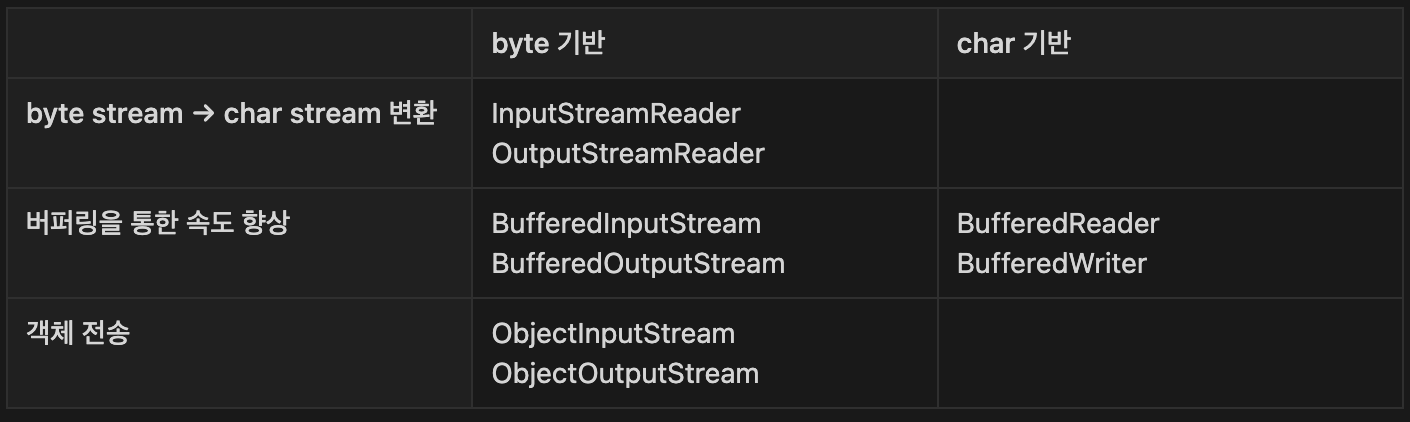
BufferedReader br = new BufferedReader(new InpuStreamReader(System.in));
Code language: JavaScript (javascript)
보조 스트림(br)의 close()가 호출되면 노드 스트림의 close()까지 자동으로 호출됨.
(System.in은 예외.)
나. InputStreamReader & OutputStreamWriter
byte 기반의 Stream을 char 기반으로 변환하는 보조 스트림.
다. Buffered 계열
스트림의 입/출력 성능 향상을 위해서 버퍼 사용.
1) BufferedInputStream & BufferedOutputStream
| 생성자 | 설명 |
| BufferedInputStream(InputStream in) | in을 이용해 크기가 8192인 버퍼를 같는 BufferedInputStream 생성. |
| BufferedInputStream(InputStream in, int size) | in을 이용해 크기가 size인 버퍼를 같는 BufferedInputStream 생성. |
| BufferedOutputStream(OutputStream out) | out을 이용해 크기가 8192인 버퍼를 같는 BufferedOutputStream 생성. |
| BufferedOutputStream(OutputStream out, int size) | out을 이용해 크기가 size인 버퍼를 같는 BufferedOutputStream 생성. |
import java.io.BufferedInputStream;
import java.io.BufferedOutputStream;
import java.io.FileInputStream;
import java.io.FileOutputStream;
import java.io.IOException;

public class FileCopyExample {
    public static void main(String[] args) {
        String sourceFile = "source.txt";
        String destinationFile = "destination.txt";

        try (
            BufferedInputStream bis = new BufferedInputStream(new FileInputStream(sourceFile));
            BufferedOutputStream bos = new BufferedOutputStream(new FileOutputStream(destinationFile))
        ) {
            byte[] buffer = new byte[1024];
            int bytesRead;

            while ((bytesRead = bis.read(buffer)) != -1) {
                bos.write(buffer, 0, bytesRead);
            }

            System.out.println("파일 복사가 완료되었습니다.");
        } catch (IOException e) {
            e.printStackTrace();
        }
    }
}
Code language: JavaScript (javascript)
2) BufferedReader & BufferedWriter
| 생성자 | 설명 |
| BufferedReader(Reader in) | in을 이용해 크기가 8192인 버퍼를 같는 BufferedReader 생성. |
| BufferedReader(Reader in, int size) | in을 이용해 크기가 size인 버퍼를 같는 BufferedReader 생성. |
| BufferedWriter(Writer out) | out을 이용해 크기가 8192인 버퍼를 같는 BufferedWriter 생성. |
| BufferedWriter(Writer out, int size) | out을 이용해 크기가 size인 버퍼를 같는 BufferedWriter 생성. |
import java.io.BufferedReader;
import java.io.BufferedWriter;
import java.io.IOException;
import java.io.InputStreamReader;
import java.io.OutputStreamWriter;
import java.util.StringTokenizer;

public class KTest {

    public static void main(String[] args) throws IOException {
        BufferedReader br = new BufferedReader(new InputStreamReader(System.in));
        StringTokenizer st = new StringTokenizer(br.readLine());
        int a = Integer.parseInt(st.nextToken());
        String input = st.nextToken();

        StringBuilder sb = new StringBuilder();
        for(int i=0; i<a; i++) {
            sb.append(input);
        }
        String str = sb.toString();
        BufferedWriter bw = new BufferedWriter(new OutputStreamWriter(System.out));
        bw.write(a);
        bw.write(str);

        bw.flush();
        bw.close();
        br.close();
    }
}
Code language: JavaScript (javascript)
참고.
![Featured image for [Java] 입출력](https://tired-i.com/wp-content/uploads/2026/01/java-image-65.png)
3) DataInputStream & DataOutputStream
DataInputStream 및 DataOutputStream은 원시 데이터 타입(primitive data types)을 바이트 스트림으로 읽고 쓸 수 있다.
import java.io.DataInputStream;
import java.io.FileInputStream;
import java.io.IOException;

public class DataInputStreamExample {
    public static void main(String[] args) {
        String fileName = "data.bin";

        try (DataInputStream dis = new DataInputStream(new FileInputStream(fileName))) {
            int intValue = dis.readInt();
            double doubleValue = dis.readDouble();

            System.out.println("Read Int: " + intValue);
            System.out.println("Read Double: " + doubleValue);
        } catch (IOException e) {
            e.printStackTrace();
        }
    }
}
Code language: JavaScript (javascript)DataInputStream을 사용하여 간단한 정수와 실수를 읽는 예제.
import java.io.DataOutputStream;
import java.io.FileOutputStream;
import java.io.IOException;

public class DataOutputStreamExample {
    public static void main(String[] args) {
        String fileName = "data.bin";

        try (DataOutputStream dos = new DataOutputStream(new FileOutputStream(fileName))) {
            int intValue = 42;
            double doubleValue = 3.14;

            dos.writeInt(intValue);
            dos.writeDouble(doubleValue);

            System.out.println("Write Int: " + intValue);
            System.out.println("Write Double: " + doubleValue);
        } catch (IOException e) {
            e.printStackTrace();
        }
    }
}
Code language: JavaScript (javascript)DataOutputStream을 사용하여 정수와 실수를 파일에 쓰는 예제입니다.
4) ObjectInputStream & ObjectOutputStream
객체를 직렬화하고 역직렬화함으로써 파일에 저장하거나 네트워크를 통해 전송하는 등 다양한 용도로 활용.
| 생성자 | 메서드 | |
| ObjectOutputStream | ObjectOutputStream(OutputStream out) | void writeObject(Object obj) |
| ObjectInputStream | ObjectInputStream(InputStream in) | Object readObject() |
라. 객체 직렬화
객체를 파일 등에 저장하거나 네트워크로 전송하기 위해서 연속적인 데이터로 변환하는 것.
자바에서 직렬화되기 위한 조건
Serializable인터페이스를 구현할 것. (내부에 구현해야 할 abstract method가 존재하지 않는 markup interface다.)- 클래스의 모든 멤버가
Serializable인터페이스를 구현해야 함. - 직렬화에서 제외하려는 멤버는
transient선언 static변수도 직렬화 대상이 아니다. (객체로 접근할 일 없음)
1) 실습
import java.io.Serializable;

public class Person {
    public static int age = 10;
    private String id;
    private transient String pass;
    private Address addr;

    public Person(String id, String pass, String zipCode, String city) {
        this.id = id;
        this.pass = pass;
        this.addr = new Address(zipCode, city);
    }

    @Override
    public String toString() {
        return "[id=" + id + ", pass=" + pass + ", addr=" + addr + "]" + age;
    }

     class Address {
        private String zipCode;
        private String city;

        public Address(String zipCode, String city) {
            this.zipCode = zipCode;
            this.city = city;
        }

        public String toString() {
            return "Address [zipCode=" + zipCode + ", city=" + city + "]";
        }
    }
}
Code language: JavaScript (javascript)
private transient String pass;: 민감한 데이터는 직렬화에서 제외한다.public static int age = 10;: 직렬화 대상에서 제외됨.
import java.io.Serializable;

public class Person implements Serializable{
    public static int age = 10;
    private String id;
    private transient String pass;
    private Address addr;

    public Person(String id, String pass, String zipCode, String city) {
        this.id = id;
        this.pass = pass;
        this.addr = new Address(zipCode, city);
    }

    @Override
    public String toString() {
        return "[id=" + id + ", pass=" + pass + ", addr=" + addr + "]" + age;
    }

     class Address implements Serializable {
        private String zipCode;
        private String city;

        public Address(String zipCode, String city) {
            this.zipCode = zipCode;
            this.city = city;
        }

        public String toString() {
            return "Address [zipCode=" + zipCode + ", city=" + city + "]";
        }
    }
}
Code language: JavaScript (javascript)
public class Person implements Serializable{,class Address implements Serializable {
: 직렬화를 위한Serializable인터페이스 구현. (내부에 구현해야 할 abstract method가 존재하지 않는 markup interface다.)
: 클래스의 모든 멤버가Serializable인터페이스를 구현해야 함.
import java.io.File;
import java.io.FileInputStream;
import java.io.FileOutputStream;
import java.io.IOException;
import java.io.ObjectInputStream;
import java.io.ObjectOutputStream;

public class ObjectStreamTest {
    public static void main(String[] args) {
        write();
        read();
    }

    private static File target = new File("c:/Temp/objPerson.dat");

    private static void write() {
        Person person = new Person("홍길동2", "pass1234", "123-456", "seoul");
        try(ObjectOutputStream output = new ObjectOutputStream(new FileOutputStream(target))){
            output.writeObject(person);
            System.out.println("출력완료");
        }catch(IOException e) {
            e.printStackTrace();
        }
    }

    private static void read() {
        try(ObjectInputStream input = new ObjectInputStream(new FileInputStream(target))){
            Object obj = input.readObject();
            if(obj != null && obj instanceof Person p) {
                System.out.println("복원된 객체");
            }
        }catch(IOException | ClassNotFoundException e) {
            e.printStackTrace();
        }
    }
}
Code language: JavaScript (javascript)
2) serialVersionUID
클래스의 변경 여부를 파악하기 위한 유일한 키.
직렬화할 때의 UID와 역 직렬화 할 때의 UID가 다를 경우 예외 발생.
직렬화되는 객체에 UID가 설정되지 않았을 경우 컴파일러가 자동 생성됨.
멤버 변경으로 인한 컴파일 시마다 변경 → InvalidClassException 초래.
import java.io.Serializable;

public class Person implements Serializable{
        public static int age = 10;
        public String name = "sam"; // 추가. 구조 변경
    private String id;
    private transient String pass;
    private Address addr;

    public Person(String id, String pass, String zipCode, String city) {
        this.id = id;
        this.pass = pass;
        this.addr = new Address(zipCode, city);
    }

    @Override
    public String toString() {
        return "[id=" + id + ", pass=" + pass + ", addr=" + addr + "]" + age;
    }

     class Address implements Serializable {
        private String zipCode;
        private String city;

        public Address(String zipCode, String city) {
            this.zipCode = zipCode;
            this.city = city;
        }

        public String toString() {
            return "Address [zipCode=" + zipCode + ", city=" + city + "]";
        }
    }
}
Code language: JavaScript (javascript)
public String name = "sam";추가하고ObjectStreamTest.main()에서read()만 실행하면…
:java.io.InvalidClassException발생.
Person의 구조가 수정되었기 때문에 새로 컴파일되면서 UID가 변경되었기 때문에.
직렬화되는 객체에 대하여 serialVersionUID 설정 권장.
import java.io.Serializable;

public class Person implements Serializable{
    private static final long serialVersionUID = -2801503818029578242L; // 추가
        public static int age = 10;
        public String name = "sam";
    private String id;
    private transient String pass;
    private Address addr;

    public Person(String id, String pass, String zipCode, String city) {
        this.id = id;
        this.pass = pass;
        this.addr = new Address(zipCode, city);
    }

    @Override
    public String toString() {
        return "[id=" + id + ", pass=" + pass + ", addr=" + addr + "]" + age;
    }

     class Address implements Serializable {
        private String zipCode;
        private String city;

        public Address(String zipCode, String city) {
            this.zipCode = zipCode;
            this.city = city;
        }

        public String toString() {
            return "Address [zipCode=" + zipCode + ", city=" + city + "]";
        }
    }
}
Code language: JavaScript (javascript)
private static final long serialVersionUID = -2801503818029578242L;
: 직렬화되는 객체에 대하여serialVersionUID설정.
3. Steam API
- Stream
: JDK 8부터 추가됨.
: Collection 데이터를 다루는데 유용한 함수형 프로그래밍 스타일의 API.
: 컬렉션, 배열 등 데이터 소스에 대한 공통적인 접근 방식 제공.
: 코드를 간결하고 가독성 있게 만듦.
: 손쉬운 병렬 처리.
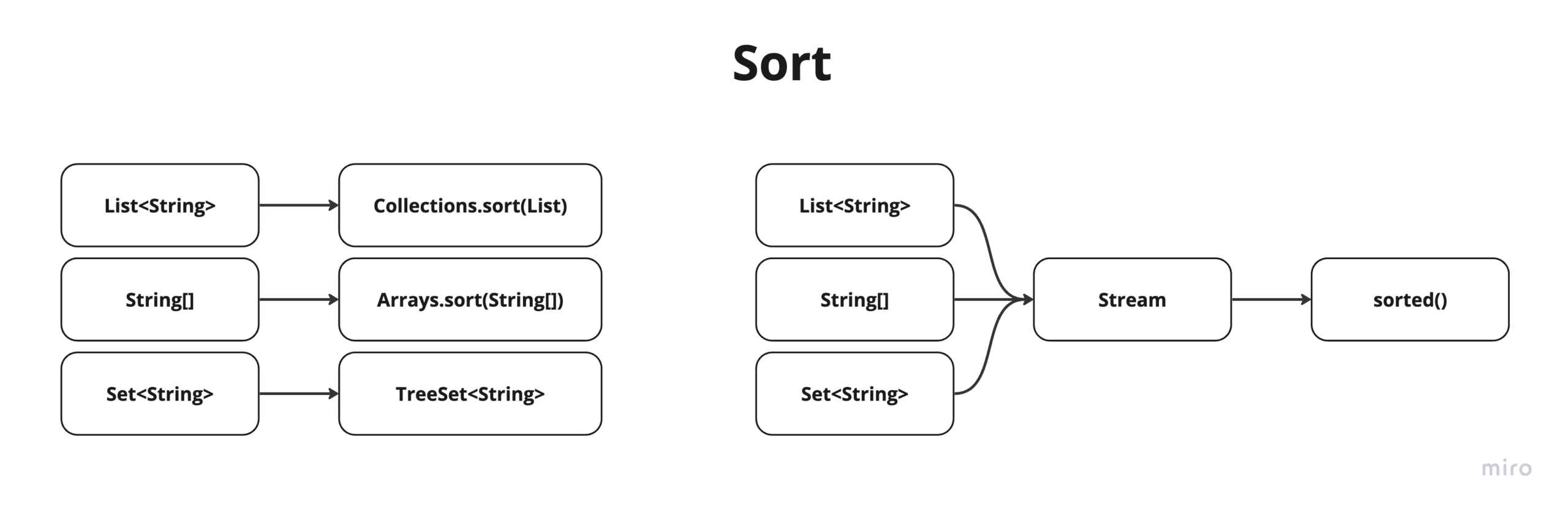
가. 스트림 생성하기
java.util.stream에 위치.
| 소스 | 메서드 |
| Collection | default Stream stream()default Stream parallelStream() |
| Array | public static Stream stream(T[] array)public static Stream of(T… values) |
| Array(int) | public static IntStream stream(int[] array)public static IntStream of(int… values) |
| Array(long) | public static LongStream stream(Long[] array)public static LongStream of(Long… values) |
| Array(double) | public static DoubleStream stream(double[] array)public static DoubleStream of(double… values) |
List<String> myList = Arrays.asList("Java", "Stream", "API");
Stream<String> myStream = myList.stream();
Code language: JavaScript (javascript)- 컬렉션으로부터 스트림을 생성
int[] numbers = {1, 2, 3, 4, 5};
IntStream numberStream = Arrays.stream(numbers);
- 배열에서도 스트림을 생성
이외에도 다양한 데이터 소스로부터 스트림을 생성할 수 있음.
나. 단계별 주요 처리 메서드
스트림은 중간 연산과 종단 연산으로 구분된다.
중간 연산
: 스트림을 다른 스트림으로 변환하거나, 요소를 필터링하거나, 변환하는 작업을 수행.종단 연산
: 최종 결과를 생성하거나, 컬렉션에 요소를 수집하거나, 스트림을 반복 등으로 마무리 짓는 작업중간 연산
| 메서드 | 설명 | 예제 |
| filter(Predicate) | 주어진 조건을 만족하는 요소만을 걸러냄 | stream.filter(x -> x > 5) |
| map(Function<t, r=””>)</t,> | 각 요소를 주어진 함수에 따라 변환 | stream.map(x -> x * 2) |
| flatMap(Function<t, stream<r=””>>)</t,> | 각 요소를 스트림으로 변환하고 평면화 | stream.flatMap(str -> Arrays.stream(str.split(” “))) |
| distinct() | 중복 요소를 제거 | stream.distinct() |
| sorted() | 요소를 정렬 | stream.sorted() |
| peek(Consumer) | 각 요소를 소비하면서 추가적인 작업 수행 | stream.peek(x -> System.out.println(“Processing: ” + x)) |
- 종단 연산
| 메서드 | 설명 | 예제 |
| forEach(Consumer) | 각 요소에 대해 주어진 동작을 수행 | stream.forEach(x -> System.out.println(x)) |
| count() | 요소의 개수를 반환 | stream.count() |
| collect(Collector<t, a,=”” r=””>)</t,> | 요소를 수집하여 컬렉션 또는 다른 형식으로 반환 | stream.collect(Collectors.toList()) |
| reduce(BinaryOperator) | 모든 요소를 하나의 값으로 축소 (최종 결과를 생성) | stream.reduce((x, y) -> x + y) |
| min(Comparator) | 최소 요소를 반환 | stream.min((x, y) -> Integer.compare(x, y)) |
| max(Comparator) | 최대 요소를 반환 | stream.max((x, y) -> Integer.compare(x, y)) |
| anyMatch(Predicate) | 적어도 한 요소가 주어진 조건을 만족하는지 여부 | stream.anyMatch(x -> x > 5) |
| allMatch(Predicate) | 모든 요소가 주어진 조건을 만족하는지 여부 | stream.allMatch(x -> x > 5) |
| noneMatch(Predicate) | 모든 요소가 주어진 조건을 만족하지 않는지 여부 | stream.noneMatch(x -> x < 0) |
| findFirst() | 첫 번째 요소를 반환 | stream.findFirst() |
| findAny() | 임의의 요소를 반환 | stream.findAny() |
| toArray() | 스트림을 배열로 변환 | stream.toArray() |
| forEachOrdered(Consumer) | 순서가 있는 경우에 각 요소에 대해 주어진 동작을 수행 (병렬 스트림에서 순서를 보장) | stream.forEachOrdered(x -> System.out.println(x)) |
다. 스트림 연산 체인
double averageLength = myList.stream()
                             .filter(s -> s.startsWith("S"))
                             .mapToInt(String::length)
                             .average()
                             .orElse(0.0);
Code language: JavaScript (javascript)
여러 중간 및 종단 연산을 연결하여 복잡한 데이터 처리 파이프라인을 생성할 수 있다.
myList.stream()
      .filter(s -> s.length() > 3)
      .map(String::toUpperCase)
      .sorted()
      .forEach(System.out::println);
Code language: CSS (css)
스트림에 중간 연산을 적용하여 필터링, 매핑, 정렬 등의 작업을 수행할 수 있다.
long count = myList.stream().filter(s -> s.startsWith("S")).count();
System.out.println("Words starting with 'S': " + count);
Code language: JavaScript (javascript)
스트림에 종단 연산을 적용하여 최종 결과를 얻을 수 있다.
라. 병렬 처리
myList.parallelStream().forEach(System.out::println);
Code language: CSS (css)
마. 람다 표현식 활용
myList.stream().forEach(s -> System.out.println(s));
Code language: CSS (css)
람다 표현식을 사용하여 간결한 코드를 작성할 수 있다.