
![Featured image for [AI] Github Copliot 설정](https://tired-i.com/wp-content/uploads/2026/01/ai-github-copli-image.png)
1. Github Copilot
인공지능의 발전이 너무 빠른 거 같다.
내가 생각하는 것보다 5배는 빠른 거 같다.
요즘 AI agent로 Claude code를 많이 사용하는 것 같다.
AI Agent를 적극적으로 활용하는 방식으로 워크플로우가 변화하는 것 같다.
정말 눈부신 발전이다.
Claude code는 언젠가 사용하게 될 것 같아서 유사한 다른 서비스부터 경험해 보기로 했다.
(사실 지갑 사정도 한몫했다.)
우선적으로 gemini-cli, opencode-ai 등도 알아봤지만 아직 프로토타입이라는 느낌이 강해서 접었다.
작년에 부트캠프에서 프로젝트할 당시 잘 사용했던 Github Copilot을 결제해서 사용해보았다.
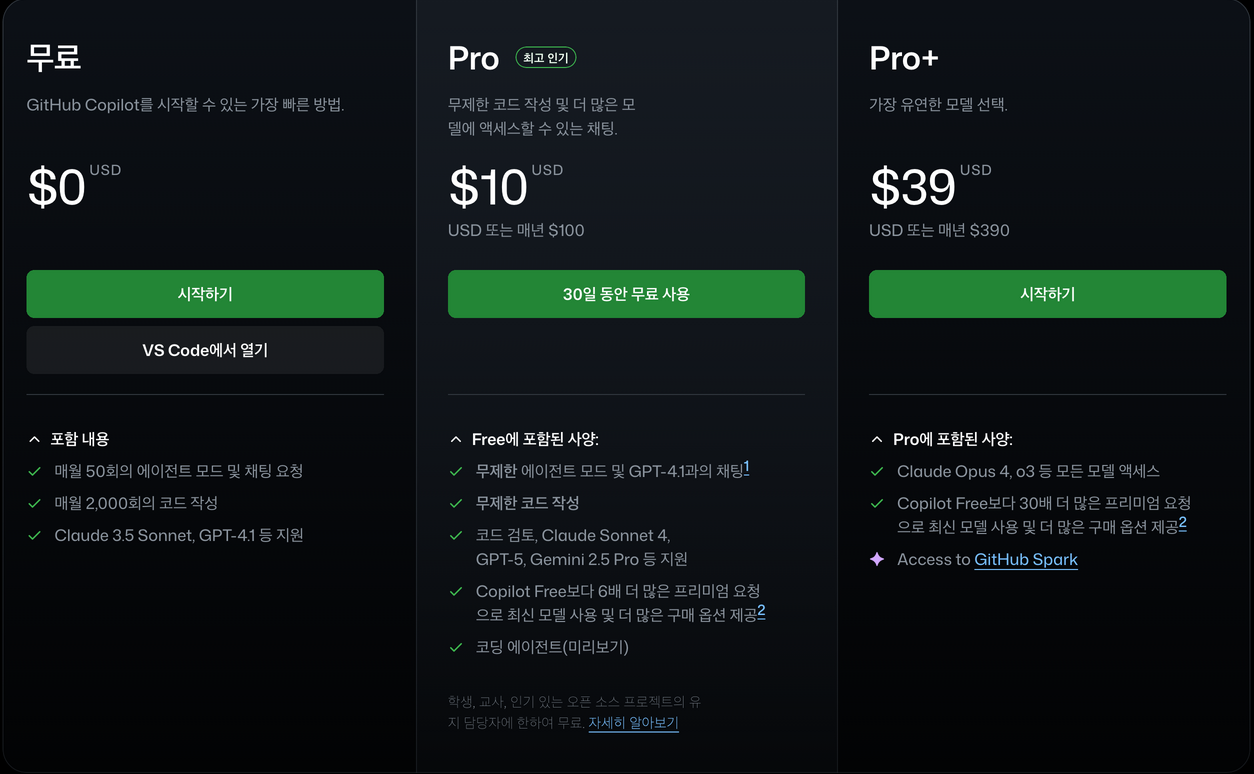
10 달러 결제해서 사용했다.
2. 지시사항이란?

한국어 공식문서가 있다.
하지만 영어로 읽는 것을 추천한다.
instructions는 자동화 도구, 챗봇, GitHub Agent, 또는 커스텀 GitHub Actions가 동작할 때 참고하는 지침(규칙, 가이드라인, 행동 방식)을 담는 파일이다.
쉽게 말해 Claude code의 CLAUDE.md에 해당한다.
Agent는 사용자의 요청을 수행하기 전에 이 파일을 읽어 동작을 결정한다.
.github/
├── instructions/             # 특정 경로
│   ├── review_instructions.md
│   └── labeling_instructions.md
└── copilot-instructions.md   # Repo 전체
└── AGENTS.md                 # 호환
└── GEMINI.md                 # 호환
└── CLAUDE.md                 # 호환
Code language: PHP (php)
Repo 수준의 instruction을 설정하고 이를 팀과 공유한다.
(물론 개인의 필요에 따라서 개인 수준의 instruction을 추가해 사용할 수도 있다.)
작성일(2025.09.08일) 기준 Github copilot이 지원하는 방법은 크게 3가지다.
아래에서 하나씩 설명하겠다.
가. Repository-wide custom instructions
Repo 내에서 이루어지는 모든 요청에 적용되는 instruction 설정 방법.
지원 대상:
- Copilot Chat
- Copilot coding agent
- Copilot code review
저장소 내 .github/copilot-instructions.md 파일로 정의된다.
나. Path-specific custom instructions
특정 경로 내에서 이루어지는 모든 요청에만 적용되는 instruction 설정 방법.
지원 대상:
- Copilot coding agent
- Copilot code review
Copilot Chat은 제외되었다.
이러한 지시사항은 저장소 내 .github/instructions 디렉토리 안의 NAME.instructions.md 파일로 정의됩니다.
(NAME은 알아서)
참고로 copilot-instructions.md과 .github/instructions/NAME.instructions.md의 범위에 동시에 포함된다면 양쪽 지시사항이 모두 적용된다.
다. Agent instructions
이외에도 다른 AI Agent 서비스에서 사용하는 방식도 호환된다.
저장소 내 어디에나 AGENTS.md 파일을 생성한다.
Copilot 작동 시, 현재 디렉터리 트리에서 가장 가까운 AGENTS.md 파일이 우선 적용된다.
또는 저장소 root 디렉터리에 CLAUDE.md 또는 GEMINI.md 파일을 생성할 수도 있다.
3. 지시사항 작성하기
가. copilot-instructions.md 파일 직접 작성하기
repository 루트에 .github/copilot-instructions.md을 생성한다.
.github 디렉토리가 이미 존재하지 않는다면 새로 만들면 된다.
마크다운 형식으로 자연어로 지시사항을 추가하면 된다.
지시사항 사이의 공백은 무시되므로 가독성과 유지보수성에 신경 써서 공백을 남발해도 괜찮다.
나. Copilot coding agent에게 copilot-instructions.md 파일 생성 요청하기
가장 많이 사용하는 방식인 것 같다.
💡주의 : Copilot coding agent는 아직 Preview 상태라서 불안정합니다. 언제든지 내용이 변경될 수 있으니 공식문서를 참고하세요.
Agents 페이지(https://github.com/copilot/agents)로 이동한다.
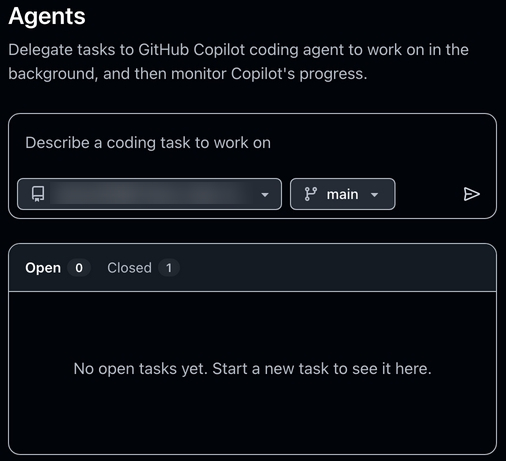
지시사항을 생성할 repository를 선택한다.
Your task is to "onboard" this repository to Copilot coding agent by adding a .github/copilot-instructions.md file in the repository that contains information describing how a coding agent seeing it for the first time can work most efficiently.

You will do this task only one time per repository and doing a good job can SIGNIFICANTLY improve the quality of the agent's work, so take your time, think carefully, and search thoroughly before writing the instructions.

<Goals>
- Reduce the likelihood of a coding agent pull request getting rejected by the user due to
generating code that fails the continuous integration build, fails a validation pipeline, or
having misbehavior.
- Minimize bash command and build failures.
- Allow the agent to complete its task more quickly by minimizing the need for exploration using grep, find, str_replace_editor, and code search tools.
</Goals>

<Limitations>
- Instructions must be no longer than 2 pages.
- Instructions must not be task specific.
</Limitations>

<WhatToAdd>

Add the following high level details about the codebase to reduce the amount of searching the agent has to do to understand the codebase each time:
<HighLevelDetails>

- A summary of what the repository does.
- High level repository information, such as the size of the repo, the type of the project, the languages, frameworks, or target runtimes in use.
</HighLevelDetails>

Add information about how to build and validate changes so the agent does not need to search and find it each time.
<BuildInstructions>

- For each of bootstrap, build, test, run, lint, and any other scripted step, document the sequence of steps to take to run it successfully as well as the versions of any runtime or build tools used.
- Each command should be validated by running it to ensure that it works correctly as well as any preconditions and postconditions.
- Try cleaning the repo and environment and running commands in different orders and document errors and and misbehavior observed as well as any steps used to mitigate the problem.
- Run the tests and document the order of steps required to run the tests.
- Make a change to the codebase. Document any unexpected build issues as well as the workarounds.
- Document environment setup steps that seem optional but that you have validated are actually required.
- Document the time required for commands that failed due to timing out.
- When you find a sequence of commands that work for a particular purpose, document them in detail.
- Use language to indicate when something should always be done. For example: "always run npm install before building".
- Record any validation steps from documentation.
</BuildInstructions>

List key facts about the layout and architecture of the codebase to help the agent find where to make changes with minimal searching.
<ProjectLayout>

- A description of the major architectural elements of the project, including the relative paths to the main project files, the location
of configuration files for linting, compilation, testing, and preferences.
- A description of the checks run prior to check in, including any GitHub workflows, continuous integration builds, or other validation pipelines.
- Document the steps so that the agent can replicate these itself.
- Any explicit validation steps that the agent can consider to have further confidence in its changes.
- Dependencies that aren't obvious from the layout or file structure.
- Finally, fill in any remaining space with detailed lists of the following, in order of priority: the list of files in the repo root, the
contents of the README, the contents of any key source files, the list of files in the next level down of directories, giving priority to the more structurally important and snippets of code from key source files, such as the one containing the main method.
</ProjectLayout>
</WhatToAdd>

<StepsToFollow>
- Perform a comprehensive inventory of the codebase. Search for and view:
- README.md, CONTRIBUTING.md, and all other documentation files.
- Search the codebase for build steps and indications of workarounds like 'HACK', 'TODO', etc.
- All scripts, particularly those pertaining to build and repo or environment setup.
- All build and actions pipelines.
- All project files.
- All configuration and linting files.
- For each file:
- think: are the contents or the existence of the file information that the coding agent will need to implement, build, test, validate, or demo a code change?
- If yes:
   - Document the command or information in detail.
   - Explicitly indicate which commands work and which do not and the order in which commands should be run.
   - Document any errors encountered as well as the steps taken to workaround them.
- Document any other steps or information that the agent can use to reduce time spent exploring or trying and failing to run bash commands.
- Finally, explicitly instruct the agent to trust the instructions and only perform a search if the information in the instructions is incomplete or found to be in error.
</StepsToFollow>
   - Document any errors encountered as well as the steps taken to work-around them.
Code language: HTML, XML (xml)
프롬프트를 복사하고 필요에 따라 수정한 후 입력한다.
# Copilot coding agent 온보딩 지침

이 리포지토리를 Copilot coding agent에 온보딩하기 위해 `.github/copilot-instructions.md` 파일을 추가하세요. 이 파일에는 repository를 처음 보는 agent가 가장 효율적으로 작업할 수 있도록 돕는 정보가 담겨야 합니다.

이 작업은 repository마다 한 번만 수행하며, 제대로 작성하면 agent의 작업 품질을 크게 향상시킬 수 있습니다. 충분히 조사하고 신중하게 작성하세요.

---

## 목표

- CI 빌드 실패, validation pipeline 실패, 오작동으로 인해 사용자에게 PR이 거절될 가능성을 줄인다.
- bash 명령 및 빌드 실패를 최소화한다.
- grep, find, str_replace_editor, 코드 검색 등 불필요한 탐색을 줄여 agent가 더 빠르게 작업을 완료하도록 돕는다.

---

## 제한사항

- 지침은 2페이지 이내여야 한다.
- 특정 task에 종속적이어서는 안 된다.

---

## 추가해야 할 내용

### 고수준 세부사항

- 리포지토리의 기능 요약
- 리포지토리 크기, 프로젝트 유형, 사용 언어·프레임워크·런타임 등

### 빌드 및 검증 지침

- bootstrap, build, test, run, lint 등 각 단계별 실행 방법과 사용되는 도구 버전
- 실제 실행하여 검증한 전제 조건과 후속 조건
- repo 및 환경 초기화 후 다양한 순서로 실행하며 발견된 오류와 해결책
- 테스트 실행 절차
- 코드 변경 후 발생한 예기치 못한 빌드 문제 및 우회 방법
- 옵션처럼 보이지만 필수인 환경 설정
- 타임아웃으로 실패한 명령과 소요 시간
- 특정 목적에 필요한 명령 순서를 상세히 기록
- 반드시 수행해야 하는 절차는 명시적으로 표현 (예: "빌드 전에 항상 `npm install` 실행")
- 문서에 있는 검증 절차 기록

### 프로젝트 레이아웃 및 아키텍처

- 주요 아키텍처 요소 설명(주요 파일 경로, lint/compile/test/설정 파일 위치)
- 체크인 전 실행되는 검사(GitHub workflows, CI 빌드, validation pipelines)
- agent가 직접 재현할 수 있도록 절차 문서화
- agent가 변경 사항을 검증할 수 있는 명시적 validation 단계
- 파일 구조로는 알기 어려운 의존성
- 남은 공간에는 다음을 우선순위대로 기록:
    - repo 루트 파일 목록
    - README 내용
    - 주요 소스파일 내용
    - 하위 디렉토리의 파일 목록(중요한 것 우선)
    - `main` 메서드를 포함한 핵심 코드 스니펫

---

## 수행 단계

- 코드베이스 전반을 조사한다.
    - README.md, CONTRIBUTING.md, 문서 파일
    - 빌드 단계 및 'HACK', 'TODO' 등 우회 표시
    - 빌드 및 환경 설정 관련 스크립트
    - 모든 빌드 파이프라인과 GitHub Actions
    - 프로젝트 파일 및 설정/린트 파일
- 각 파일에 대해 agent가 필요한 정보인지 판단한다.
    - 필요하다면 명령/정보를 상세히 문서화
    - 어떤 명령이 동작/실패하는지와 실행 순서 기록
    - 오류 및 해결 절차 기록
- agent가 불필요한 bash 명령 실행 실패로 시간을 낭비하지 않도록 필요한 정보를 추가한다.
- 마지막으로 agent에게 이 지침을 신뢰하라고 명시하고, 지침이 불완전하거나 오류가 있을 때만 검색을 수행하도록 지시한다.
Code language: PHP (php)
한국어로 번역하면 다음과 같다.
요청을 받은 Copilot은 자동으로 새로운 세션을 시작하고 풀 리퀘스트 초안을 생성한 뒤, 사용자 리뷰어로 추가하여 알림을 보낸다.
검토하고 Merge하면 된다.
다. 경로별(Path-specific) 커스텀 지침 만들기
.github/instructions디렉터리를 생성. (없다면 새로 만든다.)NAME.instructions.md형식의 파일을 하나 이상 생성.NAME은 지침의 목적을 나타냄. Agent가 의도를 이해할 수 있도록 작명.- 파일 이름은 반드시
.instructions.md로 끝나야 함.
파일의 시작 부분에 applyTo 키워드를 포함한 frontmatter 블록을 작성합니다.
---
applyTo: "app/models/**/*.rb"
---
예시 1: 특정 경로
Code language: JavaScript (javascript)
지침이 적용될 파일이나 디렉터리를 지정한다.
---
applyTo: "**/*.ts,**/*.tsx"
---
여러 패턴 지정
Code language: CSS (css)
쉼표(,)로 구분하여 여러 패턴을 동시에 지정할 수 있다.
---
applyTo: "**"
---
예시 3: 전체 파일에 적용
Code language: JavaScript (javascript)
경로를 **로 지정하면 리포지토리의 모든 파일에 지침을 적용할 수 있다.
이제 아래에 custom instruction을 Markdown 형식을 지켜 자연어로 작성하면 된다.
동일하게 지시사항 사이의 공백은 무시되므로 가독성과 유지보수성에 신경 써서 공백을 남발해도 괜찮다.